
The short answer
Windows 10/11 includes UCRT. Complete Windows updates and restart, then repair the VC++ runtime required by the application. Historical UCRT updates for older systems are not a blanket fix for Windows 10/11.
Common symptoms
Match the complete error before following the checks:
- The launch error explicitly names api-ms-win-crt-runtime-l1-1-0.dll.
- The same application still cannot run after reinstallation.
- The application works on another PC running a different Windows version.
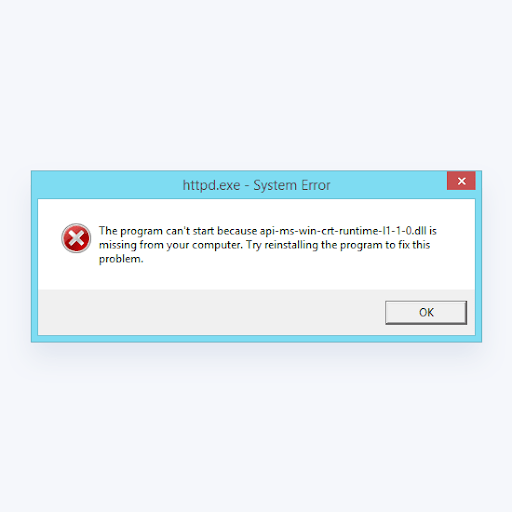
What causes api-ms-win-crt-runtime-l1-1-0.dll
The same message can have different causes. Check Windows version, application architecture and logs.
Repair steps
Follow these 4 steps in order, starting with the simplest checks.
Identify the application architecture and Windows version
Difficulty: Easy5–10 minCheck the vendor's requirements for x86, x64 or ARM64. A 32-bit application on 64-bit Windows still needs the x86 runtime. Select packages for the application, not just the operating system.
You have recorded Windows version, application architecture and the exact missing filename.
Complete Windows updates and restart
Difficulty: Easy5–10 minInstall applicable Windows updates and restart. On an old system, first check vendor support. Do not blindly apply Windows 7 update packages to Windows 10/11.
No prerequisite update is awaiting restart, and Windows meets the application's requirements.
Repair the required VC++ runtime
Difficulty: Easy5–10 minSelect a Microsoft v14 package that supports your Windows version and meets the application's version requirement. Match the application architecture and choose Repair if installed. Do not remove all runtimes to install an older package.
Read Microsoft's official guidanceSetup for the required architecture completes without a new error code.
Check system integrity and application files
Difficulty: Easy5–10 minIf Windows 10/11 still fails, follow Microsoft's instructions: in an administrator terminal run DISM.exe /Online /Cleanup-Image /RestoreHealth, then sfc /scannow. Repair the application with its original installer afterward.
Read Microsoft's official guidanceKeep the DISM/SFC results; the original message no longer appears when relaunching.
Verify the fix
Verify with the same application and launch method that originally failed:
Frequently asked questions
Does Windows 11 need the Windows 7 UCRT update?
Do not apply it that way. Use updates and repairs for your current Windows version; legacy patches apply only to their listed systems.
Can I copy a downloaded DLL into System32?
Use the complete Microsoft or application-vendor installer. A loose DLL can have the wrong architecture, version or origin and does not restore its dependencies. Do not overwrite system-directory files.