The short answer
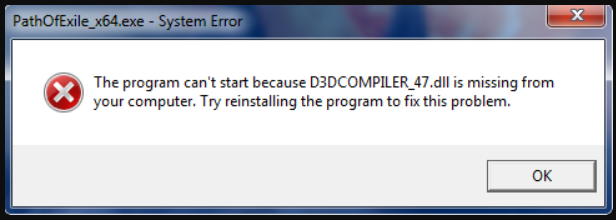
On Windows 10/11, complete system updates and verify app files; use Microsoft's system-file repair when needed. Older systems such as Windows 7 SP1 required a specific D3DCompiler update, with different applicability from current Windows.
Common symptoms
Match the complete error before following the checks:
- Startup explicitly reports D3DCompiler_47.dll missing.
- .NET or graphics-app installation is blocked on an older system.
- The same message appears after a Windows or application update.
What causes D3DCompiler_47.dll
The same message can have different causes. Check Windows version, application architecture and logs.
Repair steps
Follow these 4 steps in order, starting with the simplest checks.
Identify the application architecture and Windows version
Difficulty: Easy5–10 minCheck the vendor's requirements for x86, x64 or ARM64. A 32-bit application on 64-bit Windows still needs the x86 runtime. Select packages for the application, not just the operating system.
You have recorded Windows version, application architecture and the exact missing filename.
Apply updates for the correct Windows branch
Difficulty: Easy5–10 minOn Windows 10/11, use Windows Update and restart. On older Windows, check the supported systems on Microsoft's D3DCompiler_47 update page. Prefer upgrading the environment when the app no longer supports it.
Read Microsoft's official guidanceOnly updates applicable to the current system were installed.
Verify application files and test again
Difficulty: Easy5–10 minVerify files in the original game launcher or use the vendor's repair installer. Keep saves and settings, launch the same application through its original launcher and record any new error.
File verification completes and both launcher and application open. If the message changes, investigate the new filename.
Check system files if it still fails
Difficulty: Easy5–10 minOn Windows 10/11, follow Microsoft's instructions to run DISM.exe /Online /Cleanup-Image /RestoreHealth, then sfc /scannow, and keep the results. Do not rename _43 to overwrite _47.
Read Microsoft's official guidanceSystem checks complete and the original app no longer shows the same missing-file error.
Verify the fix
Verify with the same application and launch method that originally failed:
Frequently asked questions
Does the June 2010 DirectX package provide _47?
Do not treat _47 as the old package's _43 component. Repair _47 through the appropriate Windows updates or application installation.
Can I copy a downloaded DLL into System32?
Use the complete Microsoft or application-vendor installer. A loose DLL can have the wrong architecture, version or origin and does not restore its dependencies. Do not overwrite system-directory files.