
The short answer
Inspect SideBySide errors in Windows logs. Record the app path, Dependent Assembly, version and processor architecture. Damaged manifests or app files can trigger the same message; the newest VC++ does not cover every cause.
Common symptoms
Match the complete error before following the checks:
- The application cannot start because its side-by-side configuration is incorrect.
- The dialog asks for the event log or sxstrace.exe.
- A particular old program, launcher or updated app fails on its own.
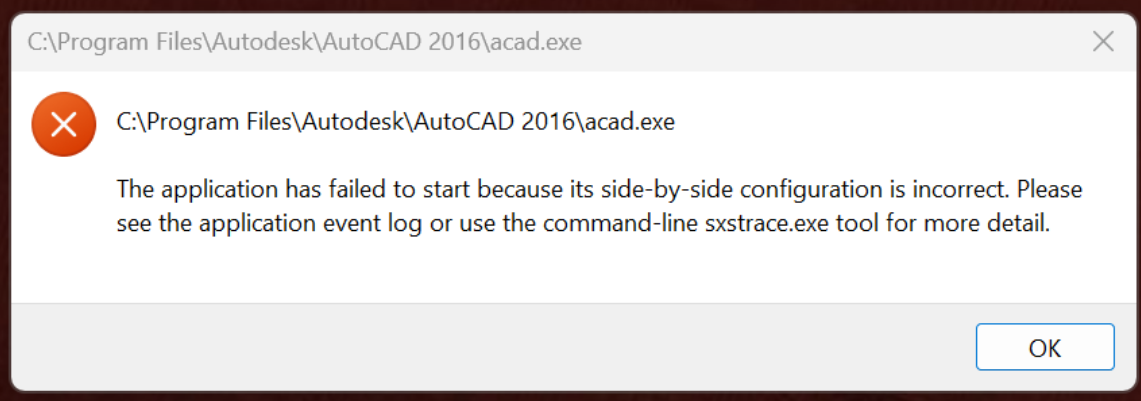
What causes Side-by-side configuration incorrect
The same message can have different causes. Check Windows version, application architecture and logs.
Repair steps
Follow these 4 steps in order, starting with the simplest checks.
Read the SideBySide event
Difficulty: Easy5–10 minOpen Event Viewer → Windows Logs → Application. Reproduce the error and inspect the SideBySide entry at the same time. Copy app path, assembly name, version and architecture.
You have the event matching this launch, rather than an old log entry.
Use sxstrace when needed
Difficulty: Easy5–10 minIn an administrator terminal run sxstrace Trace -logfile:sxstrace.etl, reproduce the issue and stop tracing as prompted. Run sxstrace Parse -logfile:sxstrace.etl -outfile:sxstrace.txt and read the specific failed assembly.
The text report identifies the missing or conflicting assembly.
Repair the version identified by the log
Difficulty: Easy5–10 minSelect VC++ by logged assembly version, architecture and vendor requirements. If the log points to the app manifest or files, repair with the original installer. Do not uninstall runtimes in bulk.
Read Microsoft's official guidanceThe required dependency installs successfully, or the vendor installer restores the manifest.
Verify application files and test again
Difficulty: Easy5–10 minVerify files in the original game launcher or use the vendor's repair installer. Keep saves and settings, launch the same application through its original launcher and record any new error.
File verification completes and both launcher and application open. If the message changes, investigate the new filename.
Verify the fix
Verify with the same application and launch method that originally failed:
Frequently asked questions
Will installing the latest VC++ always fix it?
No. Legacy assemblies, damaged manifests and architecture mismatches require different fixes. Follow the log.
Can I copy a downloaded DLL into System32?
Use the complete Microsoft or application-vendor installer. A loose DLL can have the wrong architecture, version or origin and does not restore its dependencies. Do not overwrite system-directory files.