
The short answer
Confirm that the app needs legacy optional components, then use Microsoft's full offline package. Downloading, extracting and running DXSETUP are separate steps. If it still fails, investigate the first relevant failure in the logs.
Common symptoms
Match the complete error before following the checks:
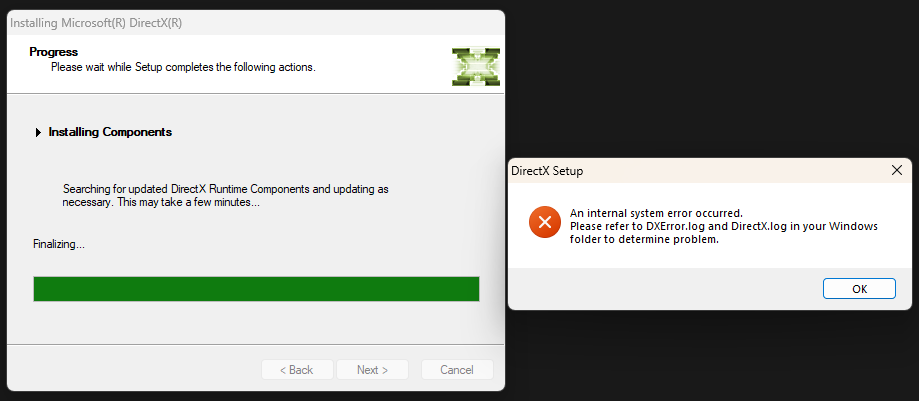
- Setup reports An internal system error occurred.
- The dialog asks you to inspect DXError.log and DirectX.log.
- A game requires DirectX Runtime but prerequisite setup does not finish.
What causes DirectX setup failure
The same message can have different causes. Check Windows version, application architecture and logs.
Repair steps
Follow these 4 steps in order, starting with the simplest checks.
Confirm requirements and keep logs
Difficulty: Easy5–10 minRecord the game's original error and exact filename. Save DXError.log and DirectX.log from the Windows directory, focusing on entries matching this attempt rather than only the last line.
You have separated the app error from the installer error and located this attempt in the logs.
Download and run the complete offline installer
Difficulty: Easy5–10 minDownload the June 2010 component package from Microsoft, extract into a separate local folder outside sync locations and run DXSETUP.exe. Follow normal system permission prompts. Extraction alone does not install components.
Read Microsoft's official guidanceSetup succeeds, or produces a new specific error with matching logs.
Address the specific logged failure
Difficulty: Easy5–10 minFor download failures, check network and package integrity. For write failures, inspect permissions and quarantine history without disabling security protection. Use Microsoft system repair when logs indicate a system-file issue.
Read Microsoft's official guidanceThe action matches the log evidence, without deleting system DLLs or editing DirectX registry versions.
Verify application files and test again
Difficulty: Easy5–10 minVerify files in the original game launcher or use the vendor's repair installer. Keep saves and settings, launch the same application through its original launcher and record any new error.
File verification completes and both launcher and application open. If the message changes, investigate the new filename.
Verify the fix
Verify with the same application and launch method that originally failed:
Frequently asked questions
Why install anything when DirectX 12 is already present?
The game may need optional components from the legacy SDK. Follow its requirements and exact filename; this package neither upgrades nor downgrades core system DirectX.
Can I bypass setup by editing the registry version?
Do not do this. A version marker does not provide component files and can hide the actual setup failure.