The short answer
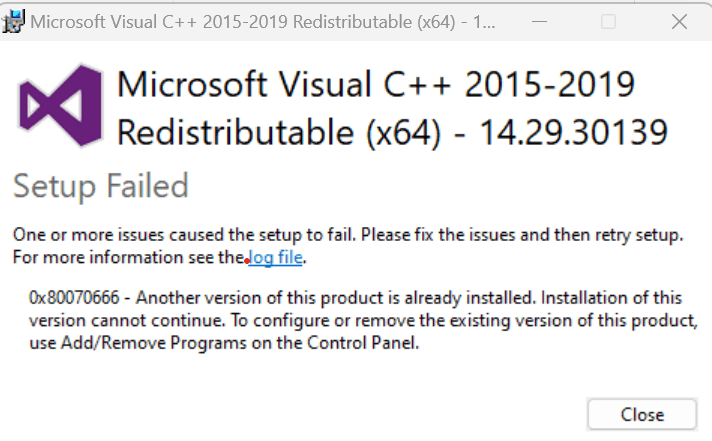
0x80070666 is a setup failure and does not prove a runtime is absent. If the log says a newer version is already installed, check Repair for the installed same-architecture v14 runtime or use a newer official installer.
Common symptoms
Match the complete error before following the checks:
- Setup displays Setup Failed and 0x80070666.
- The message says another version of this product is already installed.
- An old game-bundled installer loops while the app still asks for prerequisites.
What causes 0x80070666
The same message can have different causes. Check Windows version, application architecture and logs.
Repair steps
Follow these 4 steps in order, starting with the simplest checks.
Keep setup logs and the full error
Difficulty: Easy5–10 minOpen the installer's log link. Record package architecture/version and the Detect or Related bundle sections. Confirm a newer installed version is the actual cause.
The log identifies the version comparison or conflict.
Check the installed same-architecture runtime
Difficulty: Easy5–10 minInspect Microsoft Visual C++ v14 version and architecture in Installed apps. Compare with vendor requirements. Keep 2010/2012/2013 and other dependencies used by other apps.
You know whether an update, repair or another architecture is needed.
Repair or update with the official installer
Difficulty: Easy5–10 minSelect a Microsoft v14 package that supports your Windows version and meets the application's version requirement. Match the application architecture and choose Repair if installed. Do not remove all runtimes to install an older package.
Read Microsoft's official guidanceRepair or update completes and any restart is handled, without forcing an older v14 installation.
Verify application files and test again
Difficulty: Easy5–10 minVerify files in the original game launcher or use the vendor's repair installer. Keep saves and settings, launch the same application through its original launcher and record any new error.
File verification completes and both launcher and application open. If the message changes, investigate the new filename.
Verify the fix
Verify with the same application and launch method that originally failed:
Frequently asked questions
Must I uninstall the newer version to install the old one?
Normally keep the newer v14 that meets requirements and repair the app. Resolve a specific conflict only with explicit vendor guidance and consideration of other dependencies; do not remove everything.
Is this a missing-DLL error code?
It describes an installer version conflict. An app's missing-DLL message requires separate architecture, version and integrity checks.