The short answer
Follow these four steps in order. Reinstalling Windows is not the first step; consider reinstalling the game only if the earlier checks fail.
Common symptoms
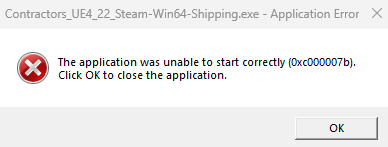
Common symptoms associated with 0xc000007b include:
- An error dialog appears when launching a game or app
- The program closes after clicking OK
- Some games exit during loading
- Other games on the same PC still work
What causes 0xc000007b
This issue can involve runtimes, DirectX, system files or software conflicts.
Repair steps
Follow these 4 steps in order, starting with the simplest checks.
Repair Visual C++ runtimes
Difficulty: Easy2–5 minMatch the Visual C++ generation and architecture to the game requirements, repair that package and retest the same executable.
Restart the game and check whether 0xc000007b still appears.
Repair DirectX components
Difficulty: Easy2–5 minRepair the DirectX runtime and restore required d3d, xinput and other game components.
Launch the game again and check that you can reach the main menu.
Check and repair system files
Difficulty: Moderate5–10 minUse built-in Windows tools to check and repair protected system files.
Restart the PC after completion, then try the game again.
Still not working? Consider reinstalling
Difficulty: Moderate10–30 minVerify game files first. Consider reinstalling only if the earlier checks do not help.
After reinstalling, check that the game files are accessible and the error no longer appears.
Verify the fix
After the repair, check these results:
Frequently asked questions
Do I need to reinstall Windows to fix 0xc000007b?
Check the reported module path, architecture and original source. Verify the game files before deciding whether Windows components need repair.
Is it safe to download an individual DLL?
Avoid individual DLLs from unknown websites. Prefer official installers or trusted repair tools.
Are the steps the same on Windows 10 and 11?
The core sequence is similar, but system screens and required runtime versions can differ.